


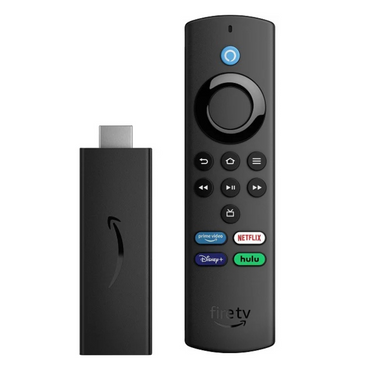


If you're weighing up the Fire TV Stick Lite vs 4K, it helps to know that Amazon sells four Fire TV Sticks, and they're easy to mix up. The Fire TV Stick Lite and Fire TV Stick HD stream in Full HD, while the Fire TV Stick 4K and Fire TV Stick 4K Max stream in 4K with Dolby Vision. The other differences come down to the remote, speed, storage and Wi-Fi.
We sell all four pre-owned in Pristine Condition, from £30 to £60, with a 12-month warranty from The Tech Gadgets. This guide compares them side by side so you can match the stick to your TV. For a wider look at the range, see our Fire TV Stick buying guide.
In this guide
- Quick picks: which Fire TV Stick to buy
- Fire TV Stick Lite vs HD vs 4K vs 4K Max compared
- HD or 4K: start with your TV
- The remote: Lite vs standard
- Speed, storage and Wi-Fi
- Buying a pre-owned Fire TV Stick
- Setting up your Fire TV Stick
- Fire TV Stick Lite vs 4K: which is better value?
- UK apps, free TV and the TV licence
- Wi-Fi, older TVs and caravans
- How to choose
Quick picks: which Fire TV Stick to buy
If your TV is 4K, buy the Fire TV Stick 4K. It's only £3 more than the HD stick and plays the same 4K, Dolby Vision and Dolby Atmos content as the 4K Max. Pick the 4K Max if you install lots of apps or have a Wi-Fi 6E router. On a Full HD TV, the HD stick is the sensible choice, and the Lite is the cheapest way to add streaming apps.

Best for most 4K TVs
Fire TV Stick 4K (Pre-owned)
4K Ultra HD at 60fps with Dolby Vision, HDR10, HDR10+, HLG and Dolby Atmos, and it still works at 1080p on an HD TV.
- Alexa Voice Remote
- 8GB storage
- 2018 or 2023 generation: message us to confirm
from £48
Buy now Add to basketAdds one to your basket. See the product page for full details and condition notes.

Fastest Fire TV Stick
Fire TV Stick 4K Max, 2nd Gen (Pre-owned)
Amazon's quickest stick, with a 2.0GHz quad-core processor, 2GB of memory, 16GB of storage and tri-band Wi-Fi 6E.
- 4K at 60fps, Dolby Vision, Dolby Atmos
- Bluetooth 5.2
- Alexa Voice Remote
from £60
Buy now Add to basketAdds one to your basket. See the product page for full details and condition notes.

Best for a Full HD TV
Fire TV Stick HD (Pre-owned)
Full HD at 60fps with HDR10, HDR10+ and HLG, and an Alexa Voice Remote with TV power, volume and mute buttons.
- 1080p, no 4K
- 8GB storage, Wi-Fi 5
- 2020 or 2024 model
from £45
Buy now Add to basketAdds one to your basket. See the product page for full details and condition notes.

Cheapest Fire TV Stick
Fire TV Stick Lite (Pre-owned)
The same 1080p picture and processor as the HD stick, with a simpler remote that has no TV controls.
- Alexa Voice Remote Lite
- 8GB storage, Wi-Fi 5
- 2020 model
from £30
Buy now Add to basketAdds one to your basket. See the product page for full details and condition notes.
Key facts
- The Lite and HD sticks stream up to 1080p. The 4K and 4K Max stream up to 4K at 60fps.
- Only the 4K and 4K Max support Dolby Vision. All four support HDR10, HDR10+ and HLG.
- The Lite's remote has no TV power or volume buttons. The other three have them.
- The 4K Max has 16GB of storage. The other three have 8GB.
- All four are pre-owned in Pristine Condition: fully working, with little or no visible wear, tested and cleaned in Manchester.
- You need your own Amazon account and Wi-Fi. Streaming subscriptions aren't included.
Fire TV Stick Lite vs HD vs 4K vs 4K Max compared
These specs come from our product listings, which we check against Amazon's developer specifications.
| Spec | Fire TV Stick Lite | Fire TV Stick HD | Fire TV Stick 4K | Fire TV Stick 4K Max |
|---|---|---|---|---|
| Price (pre-owned) | £30 | £45 | £48 | £60 |
| Resolution | Up to 1080p, 60fps | Up to 1080p, 60fps | Up to 4K, 60fps | Up to 4K, 60fps |
| HDR | HDR10, HDR10+, HLG | HDR10, HDR10+, HLG | Dolby Vision, HDR10, HDR10+, HLG | Dolby Vision, HDR10, HDR10+, HLG |
| Dolby Atmos | Via HDMI passthrough | Decoded (2020) or passthrough (2024) | Yes | Yes |
| Processor | Quad-core, up to 1.7GHz | Quad-core, up to 1.7GHz | Quad-core, up to 1.7GHz | Quad-core Cortex-A55, up to 2.0GHz |
| Memory | 1GB | 1GB | 1.5GB (2018) or 2GB (2023) | 2GB |
| Storage | 8GB | 8GB | 8GB | 16GB |
| Wi-Fi | Wi-Fi 5, dual band | Wi-Fi 5, dual band | Wi-Fi 5 (2018) or Wi-Fi 6 (2023) | Wi-Fi 6E, tri-band |
| Bluetooth | 5.0 | 5.0 | 5.0 (2018) or 5.2 (2023) | 5.2 |
| Remote | Alexa Voice Remote Lite, no TV controls | Alexa Voice Remote with power, volume, mute | Alexa Voice Remote | Alexa Voice Remote |
HD or 4K: start with your TV
Check your TV first. If it's 4K (also called Ultra HD), a 1080p stick will play everything but won't use the TV's full resolution, and you'll miss Dolby Vision. If it's a Full HD (1080p) TV, a 4K stick works fine at 1080p but you pay for picture features you can't see.
There's one reason to buy a 4K stick for an HD TV: if you might replace the TV soon. The Fire TV Stick 4K costs £48 against £45 for the HD stick, so the difference is small. You'll only see 4K and HDR on a TV that supports them, with a streaming plan that includes 4K.
The remote: Lite vs standard
The Lite comes with the Alexa Voice Remote Lite. It has Alexa voice search and playback buttons, but no TV power or volume buttons, so you'll still need your TV's own remote for those. The HD, 4K and 4K Max come with the standard Alexa Voice Remote, which adds TV power, volume and mute, so on most TVs you can put the TV remote away. That's the main practical difference between the Lite and the HD stick, which otherwise share the same picture, processor and storage.
Good to know: on the HD stick, Amazon lists Dolby Atmos decoding on the 2020 third-generation model and HDMI passthrough only on the 2024 HD model. For Atmos you need a compatible soundbar or AV receiver either way.
Speed, storage and Wi-Fi
The Fire TV Stick 4K Max is the quickest stick, with a quad-core Cortex-A55 processor up to 2.0GHz and 2GB of memory. The extra speed shows most in menus and app loading. It also has 16GB of storage, double the 8GB in the other three, which helps if you install a lot of apps.
The 4K Max has tri-band Wi-Fi 6E, which adds the 6GHz band. That only helps if your router supports Wi-Fi 6E. With an older router it connects normally over 2.4GHz or 5GHz.
The Fire TV Stick 4K comes in two generations. The 2023 model has Wi-Fi 6 and 2GB of memory, and the 2018 original has Wi-Fi 5 and 1.5GB. Both play the same apps in 4K. If you need a particular generation, message us before ordering and we'll confirm which one you'll get.
Upgrading? Sell us your old phone for store credit
Get an instant quote, post your old phone to us with free tracked postage, and choose store credit to put towards your next order. Your quote is held for 14 days and your data is wiped securely.
Get a quote for your old phoneBuying a pre-owned Fire TV Stick
All four sticks are pre-owned and sold in Pristine Condition: fully working, with little or no visible wear, after testing and cleaning in Manchester. They aren't new or sealed, and the photos are Amazon product images rather than your unit. A streaming stick has no built-in battery to wear out, and the remotes run on standard batteries. Our 12-month warranty covers faults.
In the box you get the stick and its remote. Please message us before ordering to confirm whether the power adapter, USB cable, HDMI extender, remote batteries and original box are included. Use a mains adapter rather than the TV's USB port for reliable power.
Orders placed by 3pm UK time, Monday to Friday, leave Manchester the same day. Standard delivery takes 1 to 3 working days and is free on orders of £50 or more, otherwise £4.99. Special Delivery, next working day, is £9.99. You can return unused items within 30 days, and you have a legal 14-day right to cancel. If anything is faulty, our warranty applies and you're also protected by the Consumer Rights Act 2015.
Setting up your Fire TV Stick
- Plug the stick into a free HDMI port on your TV, using the HDMI extender if it's a tight fit.
- Connect the power cable to a mains adapter and switch the TV to that HDMI input.
- Put batteries in the remote and follow the on-screen pairing steps.
- Connect to your home Wi-Fi and sign in with your Amazon account.
- Install the apps you use, such as Netflix or Disney+, and sign in to each with its own subscription.
Fire TV Stick Lite vs 4K: which is better value?
The Fire TV Stick Lite costs £30 and the Fire TV Stick 4K £48, so the 4K costs £18 more. For that you get 4K at 60fps, Dolby Vision, Dolby Atmos and the full Alexa Voice Remote with TV power and volume buttons. On a 4K TV in the living room, that's worth paying. On a Full HD TV in a bedroom, kitchen or caravan, the Lite plays the same apps at 1080p and you won't see what the 4K adds.
The HD stick at £45 sits between them. It has the Lite's picture and the full remote, which matters if the TV remote is lost or awkward. Because it's only £3 less than the 4K, we'd usually spend the extra and get the 4K, even on an HD TV you might replace.
Fire TV Stick 4K vs 4K Max: is the Max worth £12 more?
Both play the same 4K, Dolby Vision and Atmos content. The 4K Max (£60) adds a faster 2.0GHz processor, 16GB of storage and Wi-Fi 6E. Choose it if you install a lot of apps and games, if menus on your current stick feel slow, or if you have a Wi-Fi 6E router. For a few streaming apps, the 4K is enough.
UK apps, free TV and the TV licence
All four sticks run the main UK streaming apps, including BBC iPlayer, ITVX, Channel 4 and Channel 5's app for catch-up TV, plus Netflix, Prime Video, Disney+, NOW and YouTube. The catch-up apps are free to use. Paid services need their own subscription, and a Fire TV Stick doesn't include any.
The TV licence rules are the same as for any TV. You need a licence to watch or record live TV on any channel or streaming service, or to use BBC iPlayer at all. You don't need one to watch only on-demand programmes from other services, such as Netflix or ITVX catch-up. If you're unsure, check the TV Licensing website before you set up the stick.
Wi-Fi, older TVs and caravans
Streaming in 4K needs a steady connection. Netflix recommends at least 15Mbps for 4K, and HD needs less. If the stick buffers, move the router closer, use the HDMI extender to get the stick out from behind the TV, or switch to the 5GHz band in the stick's network settings.
Any of the four works on a TV with a free HDMI port. Older TVs without HDMI won't work. For 4K, the TV's HDMI port needs to support HDCP 2.2, which most 4K TVs do; on an older 4K set, use the HDMI port marked 4K or HDCP 2.2 if streams drop to HD.
In a caravan or holiday let, you can run a stick from a phone hotspot or a mobile router. Video uses a lot of data, especially in 4K, so the Lite or HD stick at 1080p is kinder to a data plan. Some hotel and campsite Wi-Fi with a sign-in page can be awkward on streaming sticks, so test it before you rely on it.
As a Christmas present
A Fire TV Stick is a popular gift because it works with the TV someone already has. It needs the recipient's own Amazon account, so leave the sign-in to them. Check whether their TV is 4K first, and message us if you need to confirm that the power adapter is included with your stick.
How to choose
- 4K TV and a handful of apps? The Fire TV Stick 4K (£48).
- 4K TV, lots of apps or a Wi-Fi 6E router? The Fire TV Stick 4K Max (£60).
- Full HD TV and you want one remote? The Fire TV Stick HD (£45).
- Full HD TV in a spare room, caravan or kitchen, with the TV remote within reach? The Fire TV Stick Lite (£30).
Frequently asked questions
Which Fire TV Stick should I buy?
For a 4K TV, the Fire TV Stick 4K at £48. Choose the 4K Max at £60 for faster menus, 16GB of storage and Wi-Fi 6E. For a Full HD TV, the HD stick at £45, or the Lite at £30 if you don't need TV buttons on the remote.
What's the difference between the Fire TV Stick Lite and the HD?
Both stream up to 1080p with the same processor and 8GB of storage. The HD stick's Alexa Voice Remote adds TV power, volume and mute buttons. The Lite's remote has voice search and playback controls only.
Is the Fire TV Stick 4K Max worth the extra over the 4K?
If you install lots of apps or have a Wi-Fi 6E router, yes. The 4K Max has a faster 2.0GHz processor, 16GB of storage and Wi-Fi 6E. Both play the same 4K, Dolby Vision and Dolby Atmos content.
Will a 4K Fire TV Stick work on an HD TV?
Yes. The Fire TV Stick 4K and 4K Max work at 1080p on a Full HD TV. You'll only see 4K and HDR on a TV that supports them.
Are your Fire TV Sticks new?
No. They're pre-owned and sold in Pristine Condition: fully working, with little or no visible wear, after testing and cleaning in Manchester. Each comes with our 12-month warranty.
Is the power adapter included?
Please message us before ordering to confirm whether the power adapter, USB cable, HDMI extender, remote batteries and original box are included. Use a mains adapter rather than the TV's USB port.
Which Fire TV Stick is best for an older TV?
For a Full HD or HD Ready TV with an HDMI port, the Fire TV Stick HD (£45) or Lite (£30). Both stream up to 1080p. The HD stick's remote adds TV power and volume buttons. TVs without HDMI won't work.
Do I need a TV licence to use a Fire TV Stick?
You need a TV licence to watch or record live TV on any channel or service, or to use BBC iPlayer. You don't need one if you only watch on-demand programmes from other services, such as Netflix.
Is the Fire TV Stick Lite or 4K better value?
For a 4K TV, the Fire TV Stick 4K at £48. For £18 more than the Lite it adds 4K, Dolby Vision, Dolby Atmos and a remote with TV power and volume buttons. For a Full HD TV in a spare room or caravan, the Lite at £30 is enough.
Upgrading? Sell us your old phone for store credit
Get an instant quote, post your old phone to us with free tracked postage, and choose store credit to put towards your next order. Your quote is held for 14 days and your data is wiped securely.
Get a quote for your old phoneReady to order? Every device comes with a 12-month warranty and 30-day returns on unused items, on top of your 14-day legal right to cancel. Order by 3pm Monday to Friday for same-day dispatch from Manchester.
Shop Fire TV Sticks
- Fire TV Stick 4K (Pre-owned)
- Fire TV Stick 4K Max, 2nd Gen (Pre-owned)
- Fire TV Stick HD (Pre-owned)
- Fire TV Stick Lite (Pre-owned)
Related guides
- Amazon Fire TV Stick Buying Guide UK (2026): Which Model Should You Buy?
- PS5 vs Xbox Series X vs Nintendo Switch OLED: Best Refurbished Gaming Console to Buy in the UK (2026)
- AirPods vs Samsung Galaxy Buds: Which Wireless Earbuds Should You Buy in the UK?
- Which AirPods Should You Buy in 2026? Every Generation Compared
- PS5 Controller vs Xbox Controller UK: Which Should You Buy?

